Read an eligibility check
What do Met, Unknown and Appears compatible mean, and where is the source?
You are searching as your Data Scientist profile and have found a London posting worth a closer look. Before you apply, you want to know whether you could get a visa for it. Portage checks the job and your profile against each visa route for the job's country, rule by rule, and shows you the official page every rule comes from.
Open the check for a job
- In the sidebar, under Searching as, choose the profile you are applying with. Checks use that profile's facts.
- Open Jobs and select a posting.
- In the job details, select the Immigration tab.
The tab shows a Sponsorship card with what the posting says about visa sponsorship, then one card for each visa route in the job's country.
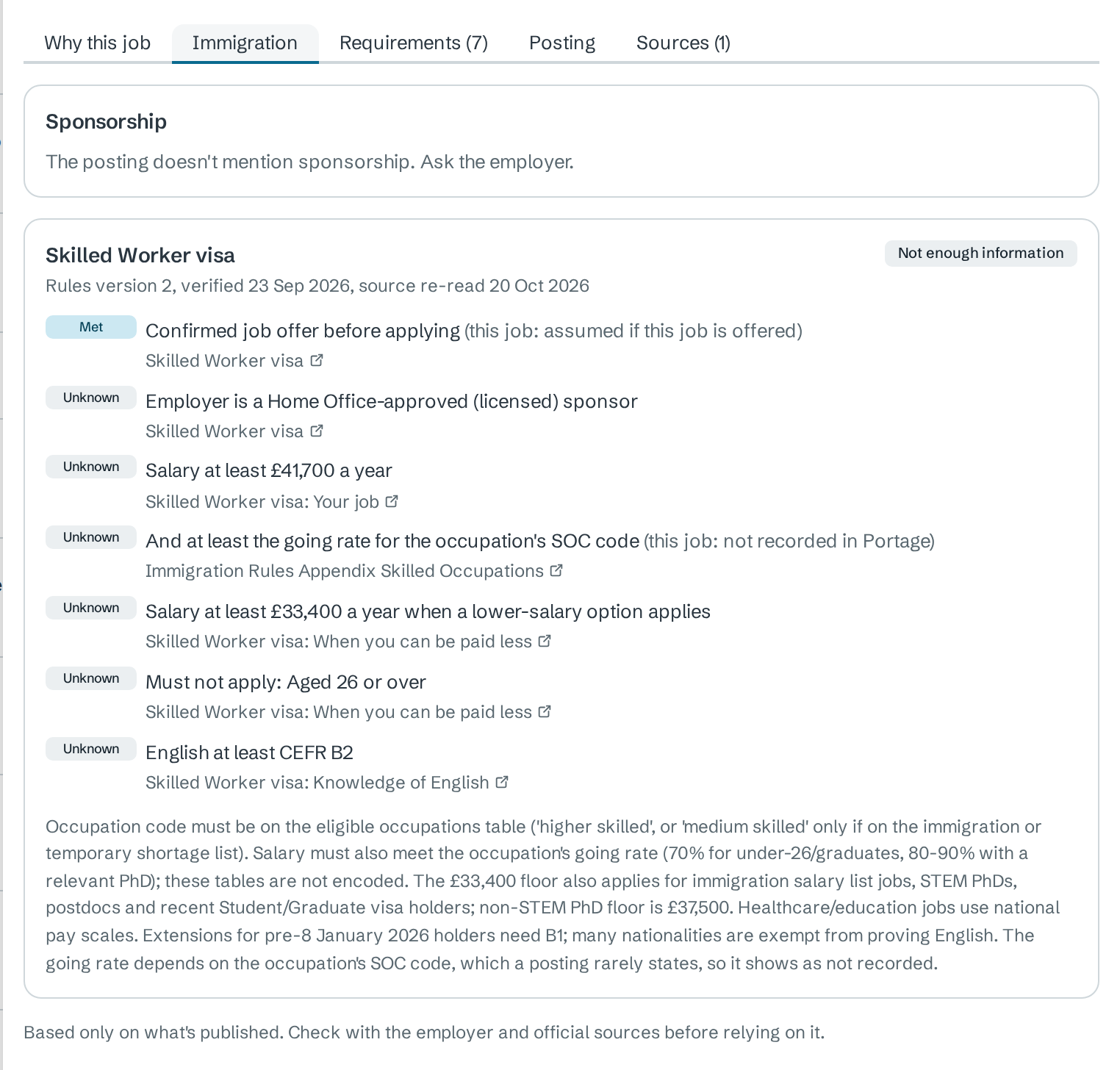
Read a route card
Each route card has three parts.
| Part | Example | What it tells you |
|---|---|---|
| Route name and outcome | Skilled Worker visa · Not enough information | Portage's summary for this job and profile, explained below |
| Version line | Rules version 2, verified 23 Sep 2026, source re-read 20 Oct 2026 | When the rules were last checked by a person, and when Portage last re-read the official page |
| One row per rule | Unknown English at least CEFR B2 | Whether this job and profile meet the rule, with a link to the official page it comes from |
Each rule
| Badge | Meaning |
|---|---|
| Met | The profile or posting shows the rule is satisfied. |
| Not met | The profile or posting shows the rule is not satisfied. |
| Unknown | Portage does not have the fact it needs. Portage never treats a missing fact as met. |
The grey text after a rule says what Portage knows about this job:
- (this job: not recorded in Portage) means neither the posting nor your profile gives the fact. A UK posting rarely states its occupation (SOC) code, for example.
- (this job: assumed if this job is offered) applies to rules about having a job offer.
- A rule that starts Must not apply: is met when the condition is false, such as Must not apply: Aged 26 or over for a lower-salary option.
A salary published in another currency stays Unknown. Portage does not convert currencies for an eligibility check.
The outcome
| Outcome | When Portage shows it |
|---|---|
| Appears compatible | Every rule is decided and met. |
| Possibly compatible | Some rules are still unknown, and at least half are met. |
| Not enough information | Some rules are still unknown, and fewer than half are met. |
| A requirement isn't met | At least one rule is not met. |
| Rules not configured | Portage has no rules for this route yet. |
None of these is a decision on your visa. Under the routes Portage says: "Based only on what's published. Check with the employer and official sources before relying on it."
Check the source
Every rule links to the official page it was taken from. Select the link to open that page in a new tab. Hover over it to see the publisher and the date Portage retrieved it.
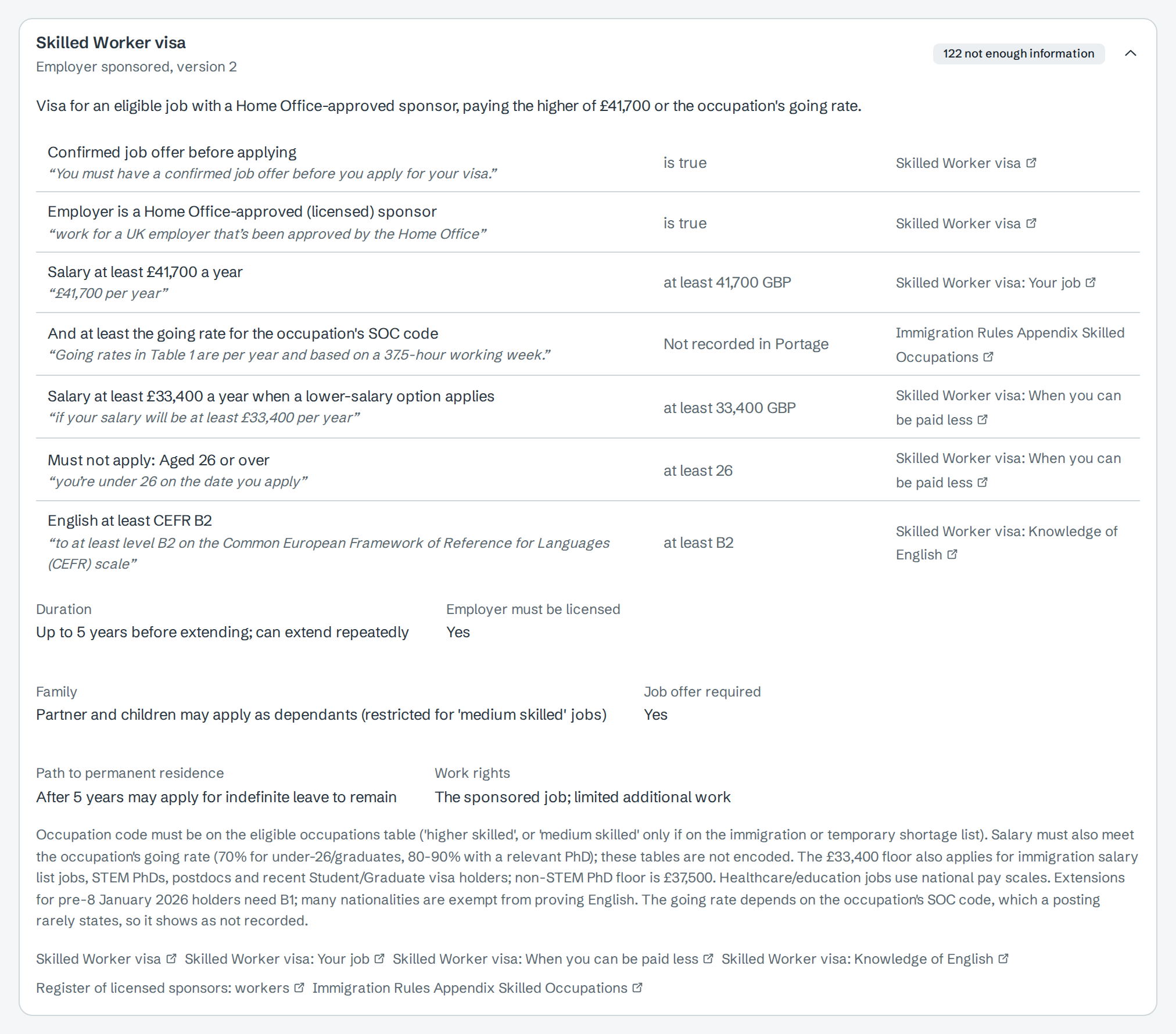
To see the exact words Portage relies on, open the country instead:
- Open Countries and select the country, here United Kingdom.
- Select the route to expand it.
Each rule shows the official text in quotation marks, the value Portage tests, and the source link. Below the rules are the route's duration, family, work rights and path to permanent residence.
Turn Unknown into an answer
Most Unknown rows come from facts your profile does not state yet. The country page lists them under What Portage doesn't know.

Add those facts to the profile, then select Refresh matches on the Jobs page so the checks are run again with them. Facts about the employer, such as whether it is a licensed sponsor, can only come from the employer or the official register.
When a rule changes
Portage re-reads each official page. If the page no longer contains the words a rule quotes, the route card shows a warning: "The official page no longer says what these rules quote, so they may be out of date", followed by the rules affected. Treat those rules as unconfirmed until the version number goes up. When a new version is saved, profiles that target the country get a notification, Immigration rules changed, linking to the country page; see When a rule changes.
Next
- Sign up and build your profile to add the facts behind Unknown checks
- Countries and routes for every route Portage covers
- Sponsor registers to check an employer's licence